

Skip to content
Certale
Use case · Training & CPD

Training and CPD certificates anyone can verify in one scan

Bring the completion list from your LMS and Certale issues every learner a certificate with their CPD hours, a certificate number and a QR code. Employers and auditors scan it to see that it is genuine, and still valid.

  • Hours and dates from your LMS
  • Free to verify, for anyone
  • No credit card
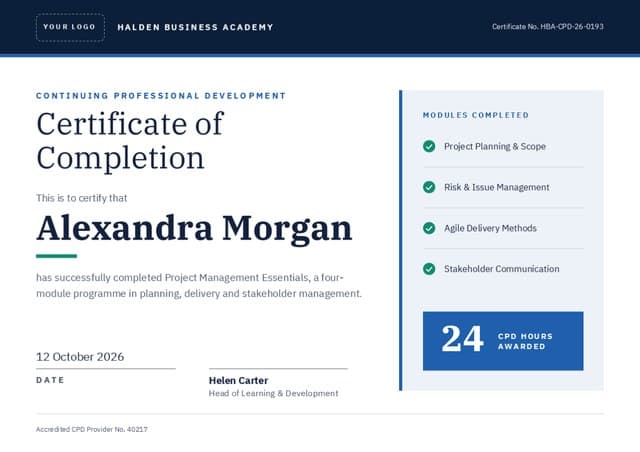
Alexandra Morgan’s Certificate of Completion for Project Management Essentials from Halden Business Academy, 24 CPD hours, on the Meridian design
24 CPD hoursProject Management Essentials
Valid · VerifiedHalden Business AcademyScan to check Alexandra’s certificate
After every cohort

From LMS export to a certified cohort

Your learning platform already knows who completed, when, and for how many hours. Certale takes that export as it is, puts each learner on the certificate, and keeps your numbers and dates exactly as recorded.

  1. Export completions from your LMS

    Download the cohort as CSV or Excel from your LMS, booking system or training spreadsheet: one learner per row, headings in the first row.

  2. Map hours, dates and numbers

    Point each column at its place on the certificate: learner, CPD hours, completion date, certificate number. Your own numbering is kept exactly as it is.

  3. Decide how long it stays valid

    Leave it open-ended, or give the batch an expiry date for courses that must be refreshed. Each learner’s date follows their own completion date.

  4. Issue, then keep the record

    Email each learner in your organisation’s name, or download one PDF for the whole cohort. Number, hours and QR code are on every copy.

Bulk issuing by plan: Free covers 25 names a month, Pro 300 and Business 1,000. Email delivery in your organisation’s name and expiry dates are on Business. Compare plans

pm-essentials-cohort-14.csvLMS export · 18 learners · 5 columns matched17 ready1 to check
Sample LMS export: five of 18 learners, with CPD hours, completion date, expiry and certificate number
LearnerCPD hrsCompletedValid untilCert no.Status
Alexandra Morgan2412 Oct 202612 Oct 2029HBA-CPD-26-0193Ready
Daniel Okoye2412 Oct 202612 Oct 2029HBA-CPD-26-0194Ready
Siobhán O’Neill2414 Oct 202614 Oct 2029HBA-CPD-26-0195Ready
Tomasz Nowak1812 Oct 202612 Oct 2029HBA-CPD-26-0196Check hours
Priya Raman2419 Oct 202619 Oct 2029HBA-CPD-26-0197Ready
+ 13 more learners, each previewed on the design. Row 4 is flagged: 18 hours on a course that awards 24.
Certificates stay valid forSet once for the batch. Try it.

3 years: Alexandra’s certificate reads “Valid until 12 Oct 2029” on paper and on her story page. After that, a scan shows it as expired.

Expiry dates are a Business feature

certale.com/t/Q3HB7K2M
Alexandra Morgan’s CPD certificate from Halden Business Academy
Alexandra Morgan
Certificate of Completion · Project Management Essentials
Verified · Halden Business Academy
CPD hours
24
Completed
12 October 2026
Certificate no.
HBA-CPD-26-0193

“Finally, a project plan that survives the first stakeholder meeting.”

Verification

Proof that holds up when someone scans it

Each certificate is printed with a QR code and a short link to its own page on certale.com. Whoever scans it, a site manager at the gate, a client’s HR team or an auditor, sees who trained the learner, on what, for how many hours, and whether the certificate still stands.

Status in plain words
Valid, Expired or Revoked sits at the top of the page, above the certificate itself.
Hours an auditor can read
CPD hours, course and completion date, without anyone opening a PDF.
Your numbering, kept
The certificate number from your records is on the page, so it matches your files.
Apprentices under 18
Private or Shareable only. The Wall of Tales and search engines never list their pages.
What does the person scanning see?Pick a status to preview the page.

Anyone scanning sees the issuer, the course, 24 CPD hours and the date it runs to. No sign-in, no phone call to your office.

Revoking and expiry dates are on Business. Checking a certificate costs the person scanning nothing, on any plan, and needs no sign-up.

Wording

Training certificate wording

Six English examples and one in Arabic, from a one-day workshop to an accredited qualification. The highlighted name comes from your learner list; every other word is yours to edit.

Training records and certificates spilling out of a folder

What a training certificate should show

  • Your organisation’s name and logo
  • The course title, worded as in your catalogue
  • The learner’s full name, as on their records
  • CPD hours, points or credits awarded
  • Completion date, plus expiry if it must be refreshed
  • A certificate number you can look up
  • Accreditation body, logo and provider number
  • The trainer’s or assessor’s name and signature

Course completion

Certificate of Completion

Halden Business Academy confirms that Daniel Okoye attended and completed Presenting with Confidence, a one-day practical workshop held in Manchester.

6 November 2026 · Helen Carter, Head of Learning & Development

Say how the course was delivered: in person, live online or self-paced. It is the first thing an employer asks.


CPD hours

Continuing Professional Development

This certifies that Alexandra Morgan has completed Project Management Essentials and is awarded 24 CPD hours across four assessed modules.

12 October 2026 · Accredited CPD Provider No. 40217

Write the number with its unit, “24 CPD hours”, so learners can copy it straight into their CPD record without converting anything.

Health & safety

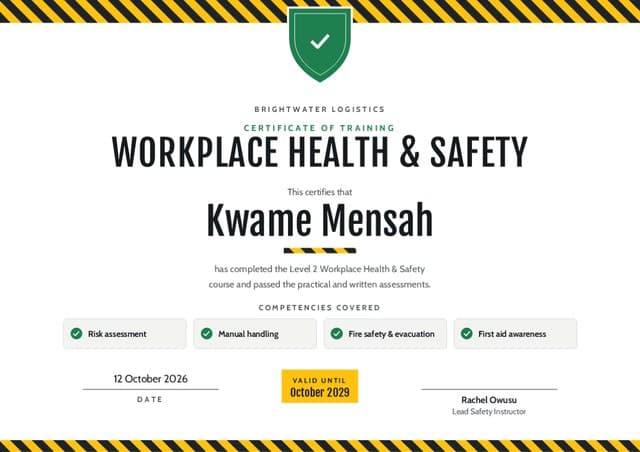
Workplace Health & Safety, Level 2

This certifies that Kwame Mensah has completed Level 2 training in risk assessment, manual handling, fire safety and first-aid awareness, and passed the practical and written assessments.

12 October 2026 · Rachel Owusu, Lead Safety Instructor

List the competencies covered. Whoever checks the certificate on site should not need the syllabus to know what it means.

Fire safety & evacuation drill

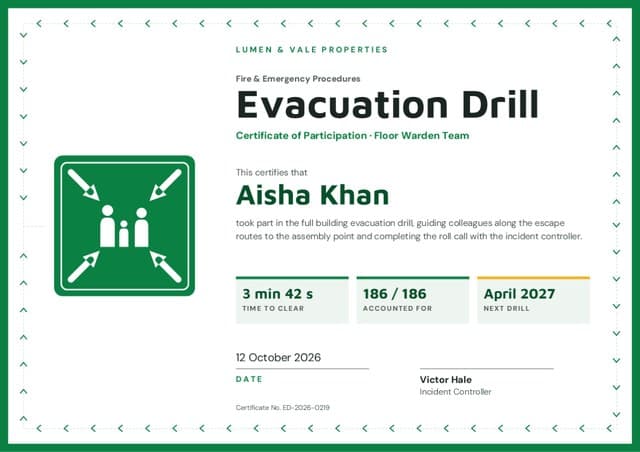
Evacuation Drill: Floor Warden

This certifies that Aisha Khan served as floor warden in the full-building evacuation drill, clearing the third floor and reporting to the assembly point within four minutes.

12 October 2026 · Victor Hale, Incident Controller

Give the drill date and the date of the next one. Wardens rotate, and this becomes their record of the duty.

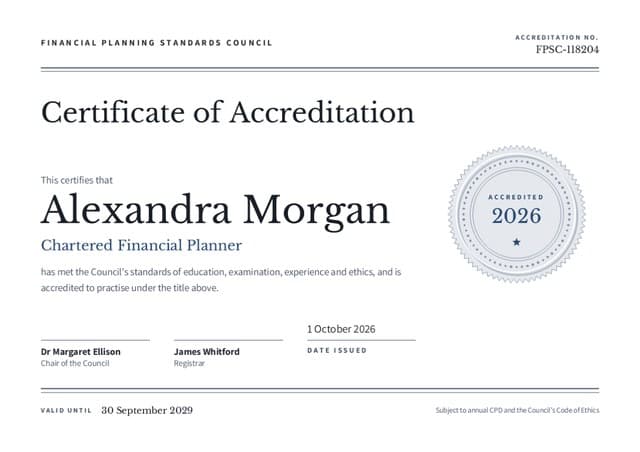
Accredited qualification

Level 3 Award in Workplace Training

This is to certify that Priya Raman has achieved the Level 3 Award in Workplace Training, assessed and quality-assured by Halden Business Academy as an approved centre.

12 October 2026 · Qualification no. HBA-L3-26-0412 · Lead Internal Verifier

Use an awarding body’s logo and wording only where your centre agreement allows it, and copy its approved title word for word.

Refresher with expiry date

Manual Handling Refresher

This certifies that Tomasz Nowak has completed the annual manual handling refresher, including a practical lifting assessment. This certificate is valid until 12 October 2027.

12 October 2026 · Brightwater Logistics Safety Team
Expiry date · Business

Put the expiry date in the text and set it on the certificate too. After that date the story page reads “Expired”, so an old printout cannot pass as current.

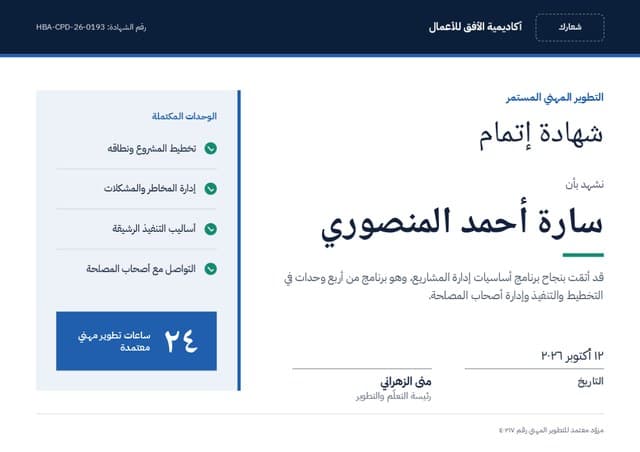
Arabic · right to left

شهادة إتمام

تشهد أكاديمية الأفق للأعمال بأنّ سارة أحمد المنصوري قد أتمّت برنامج «أساسيات إدارة المشاريع» بنجاح، وحصلت على ٢٤ ساعة تطوير مهني معتمدة.

١٢ أكتوبر ٢٠٢٦ · منى الزهراني، رئيسة التعلّم والتطوير

Hours and dates can use Arabic-Indic digits (٢٤) or Western digits (24). Pick one and use it everywhere on the certificate. Certificate numbers such as HBA-CPD-26-0193 stay in Latin characters and read left to right inside the Arabic line. Translate the course title, but keep your accreditation body’s name exactly as it is registered.

Print or digital

Hand it over in the room, file it from the inbox

Learners can leave with a printed certificate and find the same one in their inbox, with its story-page link. Both come from the batch you issued, so the number on the paper always matches your records.

  • One PDF per cohortPrint the whole group at the venue in one go, A4 or US Letter, or download a separate file for each learner.
  • PNG for profiles and intranetsLearners post it on LinkedIn; clients drop it into their staff training records.
  • A 16:9 closing slidePut the cohort’s certificates on screen at the end of the course, or in a PowerPoint deck for the client.
  • Paper that still verifiesThe printed QR code opens the live status, so a copy pinned to a noticeboard shows Expired once it has.

PDF and PNG come with every plan, Free included. For print-quality export in every size, plus PowerPoint, choose Pro or Business.

Size
Alexandra Morgan’s certificate at A4 size, landscape, QR code bottom right
A4 297 × 210 mm · landscapeThe usual size for training files in the UK and Europe.

Before you print a cohort

  • Turn off “fit to page” so the CPD panel and the QR code print at their real size.
  • Print a single proof first and check its certificate number against your records.
  • Training files get photocopied: plain paper or matt card keeps the QR code scannable from a copy.
The training team’s view

A month of courses, accounted for

One sample month across nine courses. On Pro you get basic analytics (opens and shares); Business adds full analytics (opens, scans, shares) with export, so you can see when printed certificates are being checked.

Sample data. Halden Business Academy is our demo provider.
certificates issued across nine courses
412
CPD hours certified to learners
2,946
QR scans of printed and shared certificates
137
certificates due to expire in the next 90 days
31
FAQ

Training and CPD certificate questions

How do I make training certificates for a whole cohort?

Choose a training design and add your logo, accreditation marks and the trainer’s signature. Export the cohort’s completions from your LMS or booking system as CSV or Excel, upload the file and match its columns to the certificate: name, course, CPD hours, completion date and certificate number. Check any rows Certale flags, then email the certificates or download them for printing.

How can an employer or auditor check that a training certificate is genuine?

They scan the QR code or type the short link printed on it. The story page on certale.com shows who issued the certificate, for which course, on what date and with how many CPD hours, next to a verified badge. On Business it also shows whether the certificate is still valid, has expired or has been revoked. Checking is free and needs no account.

Can a certificate show CPD hours or CPD points?

Yes. Add a column for hours, points or credits to your list and map it to the certificate. The figure prints on the certificate and appears on the learner’s story page, ready to copy into a CPD record. Use whatever unit your scheme uses; the label is yours to edit.

Can training certificates expire, and how do renewals work?

On Business you can set an expiry date for a batch and revoke a single certificate. After the expiry date the story page says Expired, including when someone scans an old printed copy. When the learner completes the refresher, issue a new certificate with its own number and date.

Can I add our accreditation logo and provider number?

Yes. Upload logos as PNG, JPG or SVG and type your provider or centre number into a text line. Use an accrediting or awarding body’s logo only where your agreement with them allows it, and keep its approved wording. On Pro and Business, the brand kit keeps your logos ready for every batch.

Does Certale connect to our LMS?

Certale works from files rather than a live connection. Almost every LMS, booking system and HR system can export a CSV or Excel file, and Certale reads it as exported. Save the design once and reuse it for every cohort: Free keeps up to 3 saved designs, Pro and Business keep unlimited saved designs.

Who can see a learner’s certificate?

The learner decides. Private means it opens only from the QR code on the certificate; Shareable means anyone with the link; Public adds it to the Wall of Tales. Apprentices and other learners under 18 are limited to Private or Shareable. Public is switched off for them, so their pages stay off the Wall of Tales and out of search results.

Which plan does a training provider need?

On Free you can make as many single certificates as you like, plus bulk from Excel for 25 names a month. Pro, at $9 a month, raises that to 300 names a month and adds your brand kit and print-quality export. Business, at $19 a month or $190 a year, is the plan for training providers: 1,000 names a month, email delivery in your organisation’s name, the verified-issuer badge, revoke or set expiry dates, full analytics and 3 team seats. Need more than 1,000 a month? Talk to us.

Certify the next cohort before they leave the room.

Try it on Free (bulk from Excel, 25 names a month), then move to Business, the plan made for training providers: 1,000 names a month, email delivery in your organisation’s name, expiry dates and 3 team seats.

A phone scanning the QR code on a certificate and showing it as verified