
Skip to content
Certale
Use case · Events & conferences

Certificates of attendance for every guest, sent the same evening

Upload the registration export after the closing session. Certale keeps the people who checked in, gives speakers and crew their own wording, and puts a QR code on every certificate that proves its holder was in the room.

  • Bulk issuing on every plan, Free included
  • CPD hours on the certificate
  • Free to verify, no account needed
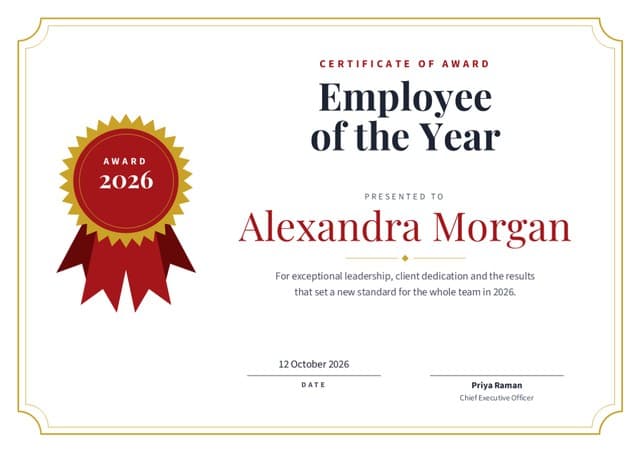
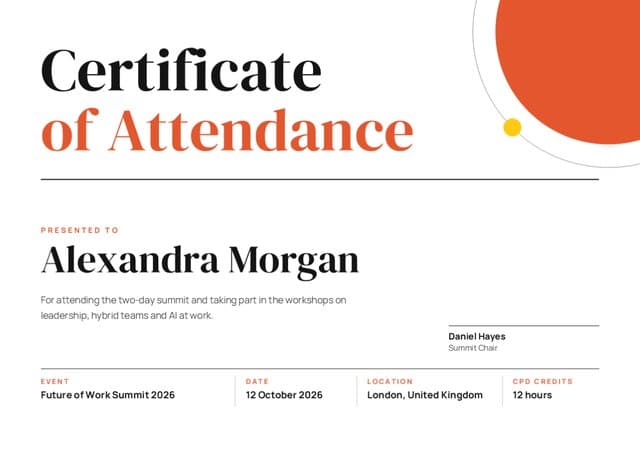
Alexandra Morgan’s Certificate of Attendance for the Future of Work Summit 2026 in London, with 12 CPD hours, on the Editorial design
12 CPD hoursprinted on the certificate
VerifiedFuture of Work SummitScan to check Alexandra was there
Registration to certificates

From check-in list to 368 certificates in one upload

Your ticketing or registration tool already knows who turned up. Export it when the last session ends, and the people who were really there get a certificate before they reach the station.

  1. Export the registration list

    Download it from your ticketing or registration tool as .csv or .xlsx. Keep the check-in column: it’s what separates attendees from no-shows.

  2. Keep only the people who came

    Point Certale at the check-in column. Rows with no check-in are set aside, so nobody receives a certificate for a day they missed.

  3. Give each ticket type its wording

    Map the ticket column to the certificate’s title line. Delegates, speakers, organisers and volunteers each get the right certificate from one upload.

  4. Send while the event is fresh

    Email everyone their certificate and story link that evening, or download a ZIP and add the links to your thank-you email. CPD hours print on each one.

How many names fit: Free covers 25 a month (a small meetup), Pro 300 (a one-day workshop series) and Business 1,000 (a full conference), with email delivery in your organisation’s name. Compare plans

fows26-registrations.csv412 rows · 5 columns matched · from the ticketing tool368 ready44 no-shows set aside
Sample registration export: five of 412 rows
RowNameTicketCheck-insCPDStatus
1Alexandra MorganDelegateDay 1 + 212Ready
2Grace AdeyemiSpeakerDay 26Ready
3Tomás RuizDelegateNo check-in0Set aside
4Ruth MensahOrganiserDay 1 + 212Ready
5Mei Lin ChuaVolunteerDay 1 + 212Ready
Only people who checked inReads the Check-ins column from your export

Certificates of attendance go only to the 368 people your check-in recorded. The other 44 stay in the list, untouched.

certale.com/t/4QW7M2HX
Alexandra Morgan’s certificate of attendance
Alexandra Morgan
Certificate of Attendance · 12 CPD hours
Verified · Future of Work Summit

“Came for the AI panel, left with a plan for my hybrid team.”

128 applause
QR story pages

Every certificate is a post about your event

Each QR code opens the attendee’s story page: the certificate, your event’s verified badge, their takeaway in their own words, and buttons to share it. When they post it on LinkedIn and tag your event, their whole network sees your name, right when early-bird tickets for next year go on sale.

Proof they were there
Employers and professional bodies confirm attendance and CPD hours with one scan.
Their takeaway, in their words
Alexandra added one line about what she’s taking back to her team.
Tagged, not just posted
Attendees tag your event page when they share, so each post points back to you.
On their LinkedIn profile
One button starts adding it to the certifications section of their profile.

Checking a certificate costs nothing and needs no account, on every plan.

Wording

Certificate of attendance wording, and eight more

Nine examples for talks, workshops, hackathons and the people behind them. The highlighted name comes from your registration export; rewrite everything else in your event’s voice.

Attendees chatting in several languages, with speech bubbles above them

What to put on an event certificate

  • The event’s full name and edition: Future of Work Summit 2026
  • What the person did: attended, spoke, led a workshop, volunteered
  • Their name exactly as they registered it
  • The date or dates, and the city, or “Online”
  • CPD hours or credits, if your audience records them
  • The organiser’s name and logo, plus any accrediting body
  • A signature from the event chair or director
  • A QR code so anyone can check the attendance

Conference attendance

Certificate of Attendance

Presented to Alexandra Morgan for attending the Future of Work Summit 2026 in London on 11–12 October, including workshops on leadership, hybrid teams and AI at work. 12 CPD hours.

12 October 2026 · Daniel Hayes, Summit Chair

Write the hours as a number next to the letters CPD. That pairing is what professional bodies look for when members log an event.


Participation

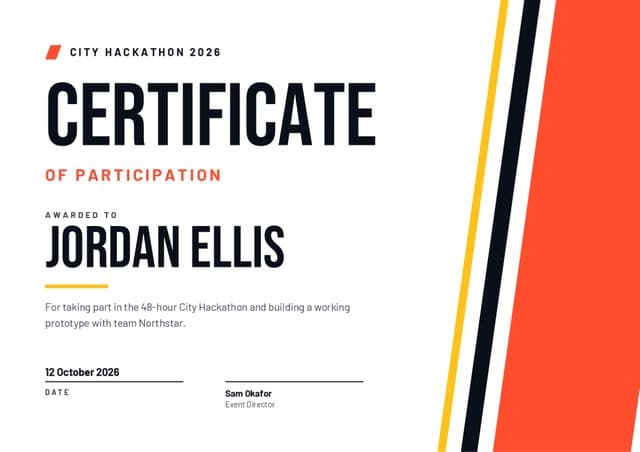
Certificate of Participation

Awarded to Jordan Ellis for taking part in the 48-hour City Hackathon 2026 as a member of team Northstar, from first idea to working prototype.

12 October 2026 · Sam Okafor, Event Director

“Participation” fits events where everyone builds or competes, like hackathons, debates and model UN. Use “attendance” when people mainly listened.

Speaker thank-you

Certificate of Appreciation

With thanks to Grace Adeyemi for leading “Hybrid teams that actually work” on the main stage of the Future of Work Summit 2026, and for answering questions long after the session ended.

12 October 2026 · Daniel Hayes, Summit Chair

Quote the talk title exactly. Speakers list these on their own websites, so the title is what they will look for later.

Hands-on workshop

Workshop Certificate

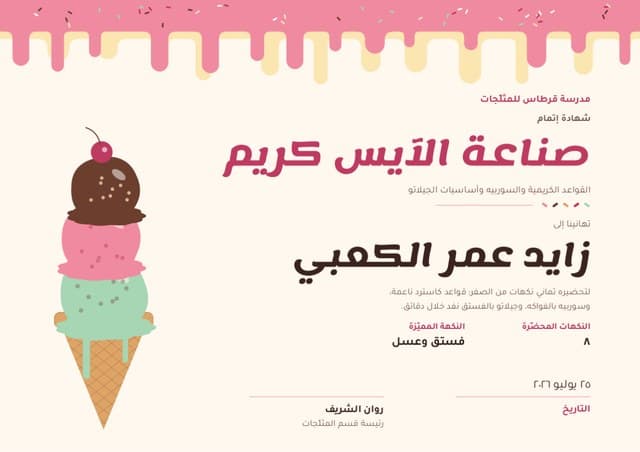
Well done, Leo Fischer! You completed Ice Cream Making: Custards, Sorbets & Gelato Basics at the Scoop & Churn Creamery School, churning eight flavours from scratch in one afternoon.

25 July 2026 · Rosa Bianchi, Head of the Creamery

Name the skill people practised. “Made eight gelato flavours” says more on a CV than “took part in a workshop”.

Hackathon winner

First Place · City Hackathon 2026

Awarded to Team Northstar (Jordan Ellis, Priya Nair, Ben Cohen and Ana Lima) for Bin Day, the waste-collection route planner judged best overall out of 31 teams.

12 October 2026 · Sam Okafor, for the judging panel

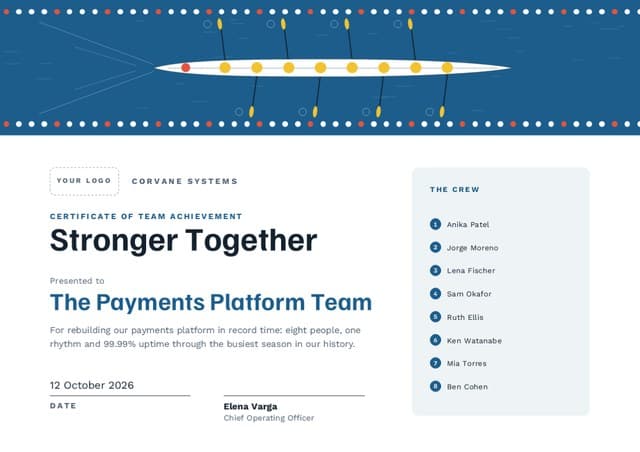
Issue one certificate per team member with the team name on each, or a single team certificate with a crew list, as the Regatta design has.

Volunteer crew

Certificate of Thanks

Thank you, Mei Lin Chua, for 14 hours on the registration desk and room crew at the Future of Work Summit 2026. Nobody got lost and every session started on time.

12 October 2026 · Ruth Mensah, Volunteer Lead

Volunteers use these for references, so include the role and the hours as well as the thanks.

Organising committee

Certificate of Recognition

Presented to Ruth Mensah in recognition of eight months on the organising committee of the Future of Work Summit 2026, leading the volunteer programme and venue partnerships.

12 October 2026 · Daniel Hayes, Summit Chair

Committee certificates are a small batch of their own. Upload them as a separate sheet so their wording never touches the delegates’ run.

Online event

Certificate of Attendance (Online)

This confirms that Samuel Osei attended the live webinar “Writing Job Adverts People Finish Reading” on 21 October 2026, for 90 minutes. 1.5 CPD hours.

21 October 2026 · Future of Work Summit, Online Series

Webinar tools export minutes attended. Set a minimum, such as 75 of 90 minutes, and remove rows below it before you upload.

Arabic · right to left

شهادة حضور

تُمنح هذه الشهادة إلى زايد عمر الكعبي تقديرًا لحضوره ملتقى مستقبل العمل ٢٠٢٦ في دبي يومي ١١ و١٢ أكتوبر، ومشاركته في ورش القيادة وفرق العمل الهجينة والذكاء الاصطناعي في بيئة العمل، بواقع ١٢ ساعة من التطوير المهني المستمر.

١٢ أكتوبر ٢٠٢٦ · رئيس الملتقى

Month names differ by region: “أكتوبر” in the Gulf and Egypt, “تشرين الأول” in the Levant and Iraq. Use the one your attendees use.

Print or digital

Digital by evening, printed for the stage

Most attendees want a link they can post, not paper to carry on the train. Print the handful you hand over in person, such as speaker thank-yous and hackathon winners, and send everyone else theirs by email.

  • PDF and PNG for every attendeeA PDF to file with CPD records and a PNG that’s ready to post. Both are on Free.
  • Print-quality for stage momentsA4, US Letter or A3 with bleed, for the speaker and winner certificates you present in person.
  • PowerPoint for the closing slideAn editable .pptx with a slide per winner, to announce the hackathon results on the main screen.
  • One QR code on screen and paperWhichever format someone holds, the code opens the same verified story page.

PDF and PNG are on every plan, Free included. Print-quality sizes and PowerPoint come with Pro and Business.

Preview by ticket type

Row 1 · Ticket: Delegate. The hours come from the CPD column, so day-pass holders get 6.

An example closing day

  • 17:30 · Closing keynote ends. Your ticketing tool has recorded every check-in across both days.
  • 17:45 · Export the registrations. Download the CSV with the Check-ins, Ticket and CPD columns left in.
  • 18:00 · Upload and match. No-shows are set aside, and rows without an email are flagged for a look.
  • 18:20 · Certificates go out. Each attendee receives theirs with a link to their story page.
  • Next day · The posts begin. Attendees share on LinkedIn and tag the event; you watch opens and shares come in.
  • Times are an example run. Email delivery is on Business; on Free and Pro, download the ZIP or copy each attendee’s link into your own thank-you email.
The organiser’s dashboard

The week after the summit

A sample two-day conference with 412 registrations, as its organiser sees it. Pro shows opens and shares; Business adds scans, plus an export for your sponsor report.

Sample data. The Future of Work Summit is a demo event, not a customer.
certificates issued to checked-in delegates, speakers and crew
368
opened by attendees within a week, 82% of them
301
shared to LinkedIn and other networks
117
applause from colleagues and fellow attendees
642
FAQ

Event and conference certificate questions

How do I send certificates of attendance to everyone who came?

Export your registration list as CSV or Excel once the event ends, keeping the check-in column. Upload it to an attendance design, tell Certale which column records check-in, and match the name, ticket and email columns. People who never checked in are set aside; everyone else gets a certificate, emailed in your organisation’s name on Business or downloaded as a ZIP on any plan.

What is the difference between a certificate of attendance and a certificate of participation?

Attendance confirms that someone was present, which suits talks, conferences and webinars. Participation says they contributed, as at a hackathon, a debate or a group exercise. Choose the one that matches what people actually did. Professional bodies that accept CPD usually expect attendance, with hours.

Can I add CPD hours or credits to the certificate?

Yes. Type a fixed figure into the design, such as 12 CPD hours for the full event, or add an hours column to your sheet when people came on different days. Each certificate then shows its own number, and so does its story page for anyone who scans it.

Can speakers, organisers and volunteers get different certificates?

Yes. Map your ticket or role column to the title line so each group gets its own heading and wording from a single upload. Or issue speakers and crew as a separate small batch on a different design.

How do attendees share their certificate on LinkedIn?

From their story page, in one tap. They can post it to their feed and tag your event, or start adding it to the certifications section of their LinkedIn profile. Either way the link leads back to the story page, where anyone can see that your organisation issued it.

Can someone check that a certificate of attendance is genuine?

Yes. Scanning the QR code or opening the short link shows the story page with your event’s name, the date and a verified badge. That check is free for anyone on every plan, with no account. On Business, a verified-issuer badge confirms your email domain, and you can revoke a certificate sent by mistake.

How many attendees can I issue certificates to?

Single certificates are unlimited on every plan. Issuing from a spreadsheet covers 25 names a month on Free, 300 on Pro and 1,000 on Business. If your event is bigger than that, talk to us about a higher limit.

Our event is for students under 18. Can their certificates be public?

No. Mark the batch as under-18 and every certificate in it can be private (opened from the QR code) or shared by private link, but never public. They stay off the Wall of Tales and out of search engines, so school hackathons and youth conferences can still send them home to parents.

Next year’s audience is reading this year’s posts.

Try it free on your next meetup with up to 25 names a month, then move to Pro or Business when the full delegate list lands. You won’t need a designer or a credit card.

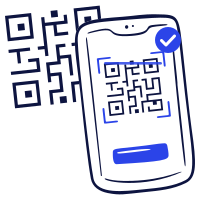
A phone scanning the QR code on a certificate to check it